Change your plan
Move to a larger plan when the business grows, or to a smaller one when you need less. A smaller plan can only be chosen when your shops and staff fit it.
Only the owner, or an Admin who can see Billing, can change the plan.
Move to another plan
- Open your account page.
- In the menu on the left, click Billing.
- Under Your plan, find the plan you want.
- Click Change plan to and the plan's name.
- Check what changes, then confirm.
Moving to a larger plan raises an invoice. You move once it is paid. See Pay for your plan.
Why a plan has a lock on it
A plan shows a lock, with a line under it, when your business does not fit it yet. For example:
- You have 2 shops. Starter allows 1.
- You have 3 staff who sign in. Starter allows 2.
Shops you bought and shops we gave you count too. Click the plan to see how to fit it.
Move to a plan with fewer shops
- Click the plan with the lock.
- Under Keep open, choose the shops that stay open.
- Check the shops marked Will be disabled.
- Click Disable 1 shop and switch (or and continue, for a plan you pay for).
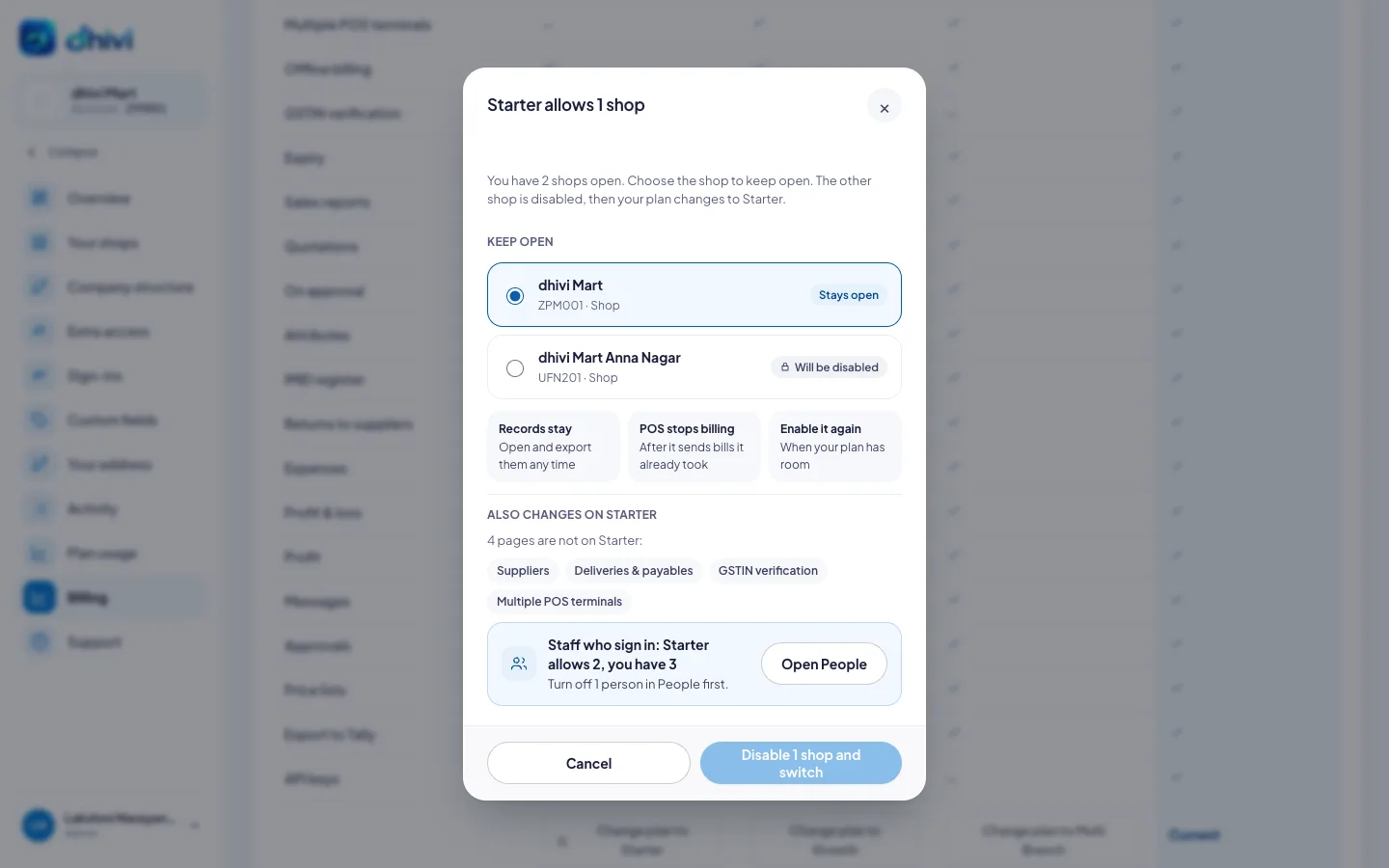
The shops you did not keep are disabled, and your plan changes in the same step. If the change does not go through, every shop stays open.
To learn what happens to a disabled shop, see Disable or enable a shop.
Move to a plan with fewer staff
- Click the plan with the lock.
- Under Staff who sign in, click Open People.
- Turn off the people who no longer need to sign in.
- Go back to Billing and change the plan.
What else changes
The popup lists the pages that are not on the new plan, for example Suppliers or Quotations. After you move, those pages show a lock in the back office. Your records in them are kept. Move to a larger plan to use them again. See A page is locked or missing.
Good to know
- Moving to a smaller plan inside a period you have paid for costs nothing and refunds nothing.
- Renewing the plan you are on is never blocked.
- Already have more shops open than your plan allows? You can't open another shop until you disable one or move to a larger plan.