Bill on a phone
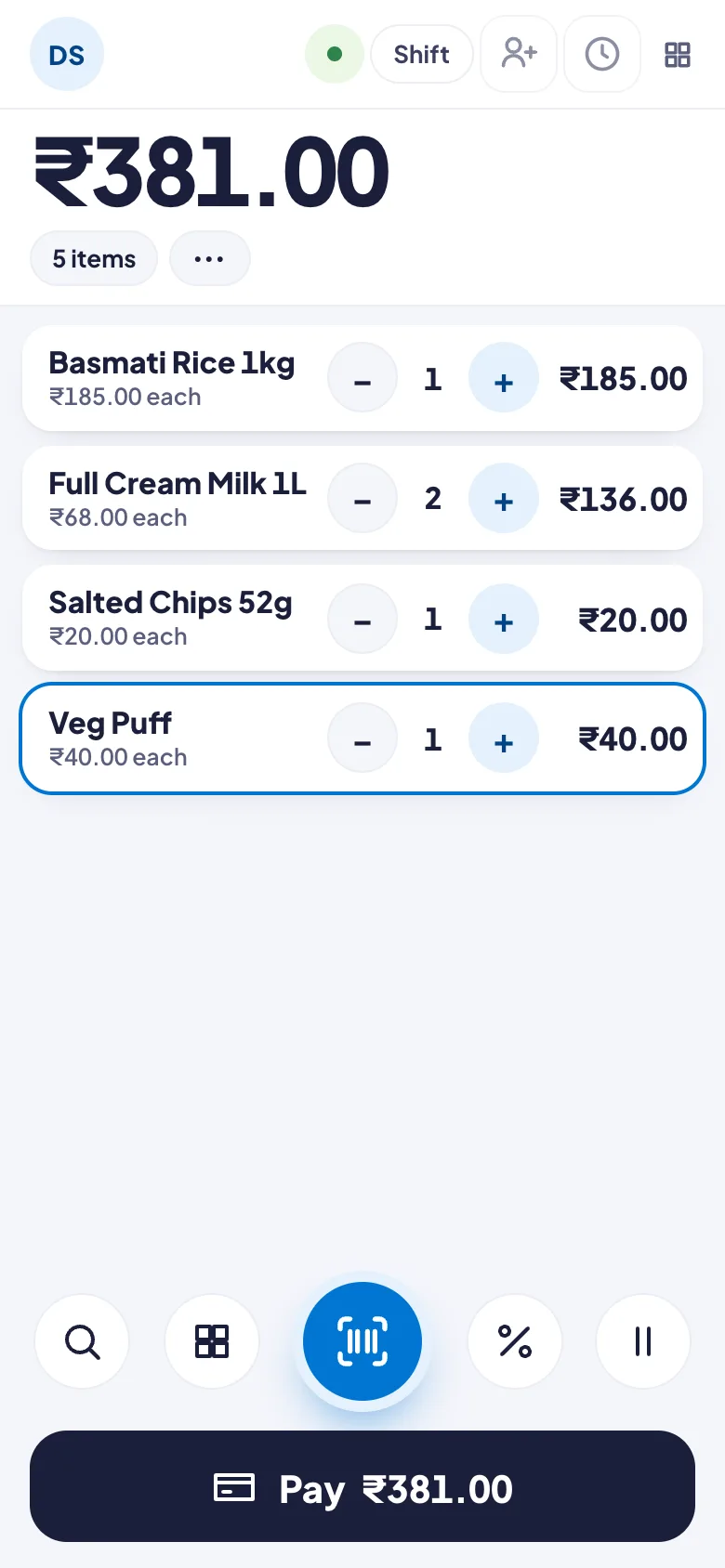
The POS works on a phone too. The total is big at the top, the items are cards with − and +, and the scan button is under your thumb.
Make a bill
- Tap the big blue scan button and scan the barcode with the phone's camera.
- No barcode? Tap the magnifier to search by name, or the four squares to pick from a category. Tap Done when you have them all.
- Tap − or + on a card to change the quantity.
- Tap Pay at the bottom. Payment works the same as on a computer. See Take payment.
The buttons at the top
- Your initials: language, light or dark, your PIN, fingerprint or Face ID, lock and sign out.
- Shift: open or close the shift, cash in or out, sync, the receipt printer and the customer display.
- The person with a +: put a customer on the bill.
- The clock: today's bills, to reprint or take a return.
- The four squares: more, like quotations and gift vouchers.
The buttons by the scan button
- %: a discount on the whole bill.
- Two bars: hold this bill and start another.
- ⋯ beside the item count: save as a quotation, send on approval, hold or clear the bill.
Good to know
- Prefer a list? The owner can switch phones to Classic. See Choose your kind of shop.
- On your own phone, sign in with your fingerprint or Face ID. See Sign in to the POS.
- To print bills from the phone, see Connect a receipt printer on Android.