Take an old phone in exchange
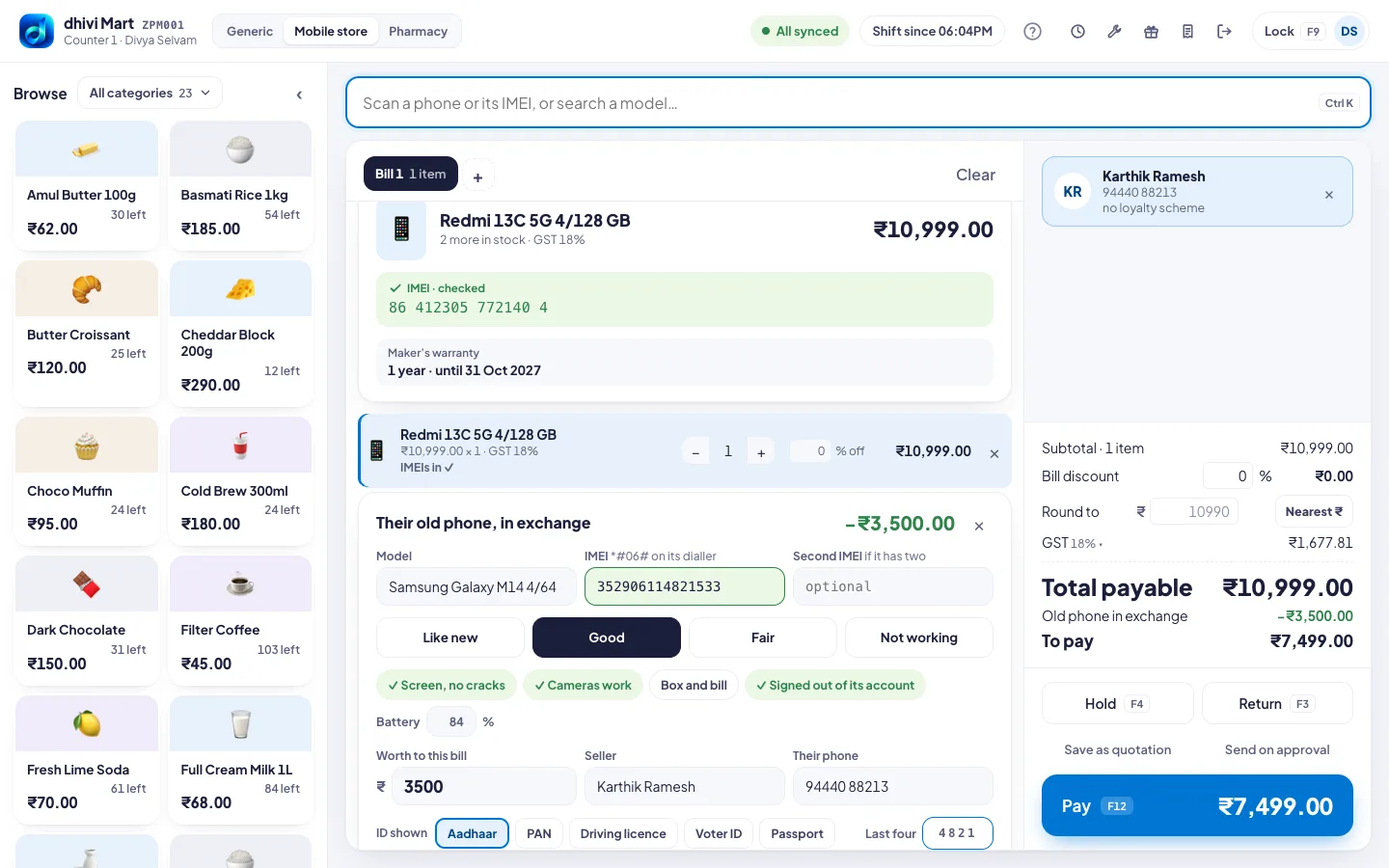
A customer buying a phone can hand over their old one. What it is worth pays part of the bill. The new phone keeps its full price and GST. This is at the POS in the Mobile store layout.
Steps
- Put the new phone on the bill and scan its IMEI.
- Add the customer. Press F2.
- Under the bill, click Take an old phone in exchange.
- Type the old phone's Model and IMEI. Dial *#06# on the old phone to see it.
- Pick its condition: Like new, Good, Fair or Not working.
- Tick what is true: Screen, no cracks, Cameras work, Box and bill.
- Tick Signed out of its account. Check this on the phone. A phone still signed in to its owner's account cannot be taken.
- Type the Battery health if you know it, and what the phone is Worth to this bill.
- Check the Seller name and phone. Pick the ID shown, like Aadhaar or PAN, and type its Last four characters.
- To pay at the bottom right is now less by what the old phone is worth. Take payment as usual.
Good to know
- The old phone goes into stock to resell, off sale until you price it.
- The bill shows the old phone's model, IMEI and value.
- Changed your mind? Click × on the old phone's card.
- To see the Mobile store layout, click Mobile store at the top of the POS. See Choose your kind of shop.