Take a return
Take back items from an earlier bill and refund in cash or store credit.
Steps
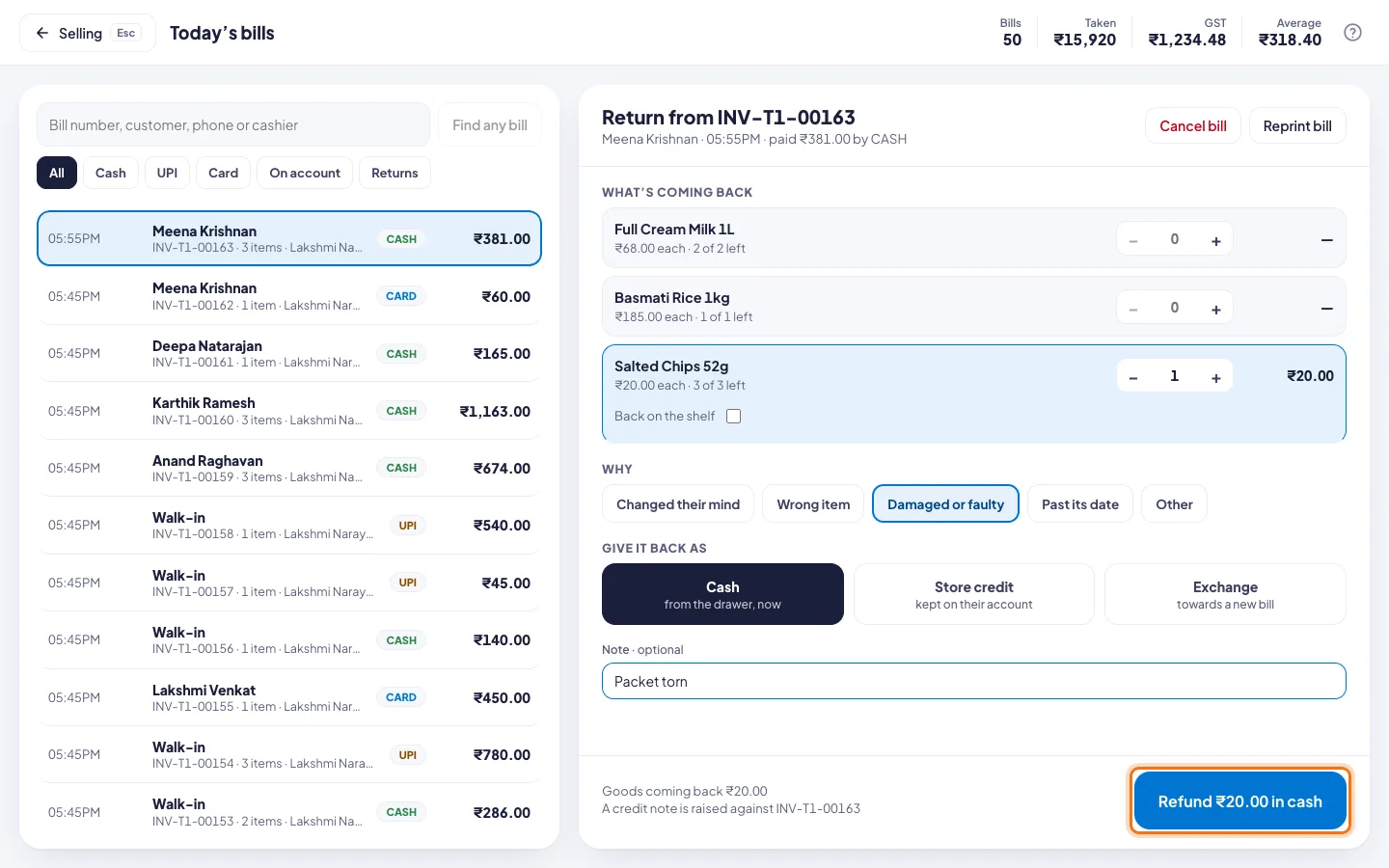
- Click Return, or press F3. Today's bills opens.
- Find the bill. Search by bill number, customer, phone or cashier.
- Click the bill.
- Under What's coming back, tap + beside each item coming back.
- Under Why, pick Changed their mind, Wrong item, Damaged or faulty, Past its date or Other.
- Under Give it back as, pick:
- Cash from the drawer, now.
- Store credit kept on the customer's account.
- Exchange towards a new bill.
- Add a note if you like.
- Click the button at the bottom, for example Refund ₹20.00 in cash.
Good to know
- Back on the shelf puts the item back into stock. Untick it for damaged goods.
- A bill from an earlier day or another shop? Type its number and click Find any bill.
- Right after a sale, Return items on the Paid screen opens the same form.
- A credit note is made for every return.
- Store credit and exchange need a customer on the bill.
- A large refund needs a manager's PIN. See Set what needs a manager.