Keep your brands tidy
A brand is the maker on a product, like Aashirvaad or Amul. It is optional, and one list serves every shop in your business.
Add a brand
The quickest way is on the product itself:
- Open Add product and type the name.
- The Brand box fills in when the name starts with a brand you have, like Amul Butter 100g, or when similar products carry one. It is marked From the name.
- To pick another, click the Brand box and type. Choose a brand from the list, or click Create brand to make a new one.
You can also click Brands in the menu, then Add brand. Enter the Brand name and click Add brand.
Rename, merge or delete
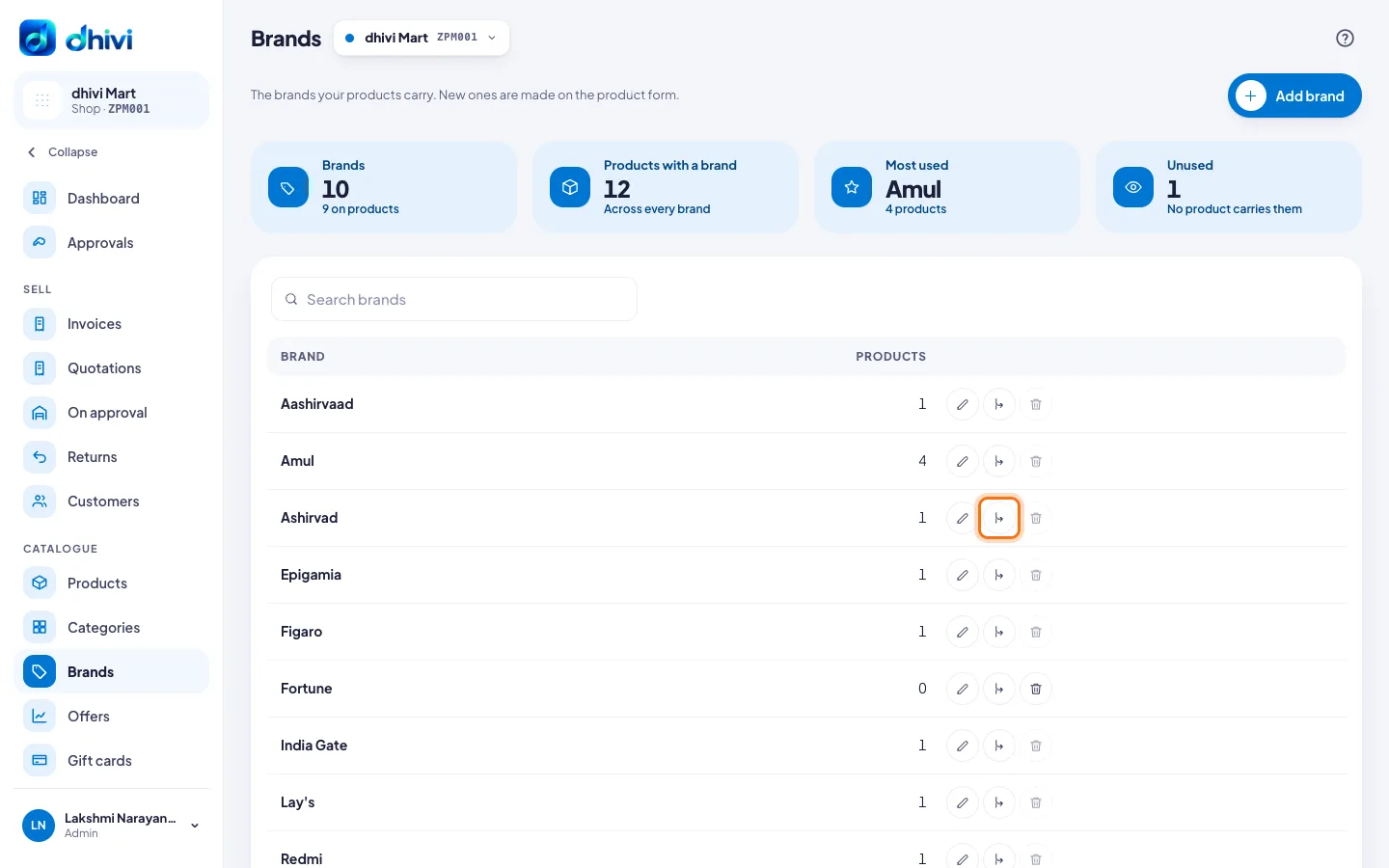
Click Brands in the menu. Each brand has three buttons on its row.
- Rename (the pencil, or click the row): change the name and click Save. Every product with that brand shows the new name.
- Merge (the middle button): use it when one brand was typed two ways, like Ashirvad and Aashirvaad. Click it on the one to remove. Under Keep, select the one to keep, then click Merge into and its name. Its products move across.
- Delete (the bin): works only when no product carries the brand. Click Delete brand to confirm.
Good to know
- Capitals do not make a new brand: amul and Amul are the same.
- The cards at the top show how many brands you have, the most used one, and how many are Unused.
- Merging and deleting are for admins. Managers can add and rename brands.